

What is WebMCP? It is a proposed web standard that lets a website declare, in a structured way, which tasks an AI agent can perform on it — finding products, filling in a form, building a post in the editor — without forcing the agent to guess its way through the interface by reading HTML or analyzing screenshots. For anyone running WordPress, the topic became very concrete this week: on September 30, 2026, a pull request was opened in the official WordPress AI plugin repository adding a WebMCP experiment to the block editor.
In this article we explain how WebMCP works, how it differs from the MCP Adapter we covered earlier on this blog, what is already available for WordPress, and what makes sense to do — or avoid — right now.
Understanding WebMCP
When an AI agent uses a website through a browser today, it behaves like an extremely patient visitor: it reads the page, tries to figure out what each button does, clicks, waits for the page to load, and checks the result. It works, but it is slow, burns a lot of tokens, and can break after a simple layout change.
WebMCP flips that around. Instead of the agent inferring the interface, the site registers its own tools — each with a name, a natural-language description, a JSON schema for its parameters, and a function that performs the action. The agent running in the browser can read that list and call the right tool with the right inputs.
A few facts help place the proposal’s maturity:
- The specification is a Draft Community Group Report from the W3C Web Machine Learning Community Group, so it is not yet an official W3C standard. The latest draft is dated September 30, 2026.
- The API lives at
document.modelContext. In July 2026 it moved fromnavigator.modelContexttodocument, so older tutorials may show outdated code. - Chrome opened a public origin trial starting with version 149 (announced June 9, 2026). For local testing, you can enable
chrome://flags/#enable-webmcp-testing. - Edge has experimental support behind a flag. Firefox and Safari take part in the discussions but have not announced an implementation.
The proposal covers two ways to expose tools: an imperative approach, written in JavaScript, and a declarative one, based on annotating existing HTML forms. The declarative approach is still incomplete in the specification.
A WebMCP Tool in Practice
Here is a minimal example using the imperative API: a read-only tool that searches a WordPress blog’s articles through the site’s own REST API.
if ('modelContext' in document) {
  const controller = new AbortController();

  document.modelContext.registerTool({
    name: 'search_articles',
    title: 'Search blog articles',
    description: 'Searches published blog articles by keyword.',
    inputSchema: {
      type: 'object',
      properties: { term: { type: 'string' } },
      required: ['term'],
    },
    annotations: { readOnlyHint: true },
    execute: async ({ term }) => {
      const r = await fetch('/wp-json/wp/v2/search?search=' + encodeURIComponent(term));
      return JSON.stringify(await r.json());
    },
  }, { signal: controller.signal });
}
Three details matter here. The 'modelContext' in document check prevents errors in browsers that don’t support the API yet. The readOnlyHint annotation tells the agent the tool only reads data and changes nothing. And the AbortController is the mechanism the specification provides for removing the tool later — there is no unregisterTool() function.
WebMCP vs. the MCP Adapter
In September we published an article about the WordPress MCP Server, showing how the Abilities API and the MCP Adapter can turn a site into an MCP server. The names are similar, but the two were designed for different scenarios:
| MCP Adapter (server) | WebMCP (browser) | |
|---|---|---|
| Where it runs | On the WordPress server | In the page loaded in the browser |
| Who calls it | MCP agents and clients such as Claude, IDEs, and automations | The agent built into the visitor’s browser |
| Authentication | Dedicated user, application password, STDIO or HTTP | The session of whoever has the page open |
| Human involvement | Can run unattended | Designed for tasks a person is watching |
The two can work together. The MCP Adapter is better suited to automations and back-office integrations. WebMCP covers the case where someone is on the site and asks the browser’s assistant to do something for them — for example, filtering products in a store or rearranging the blocks of a post.
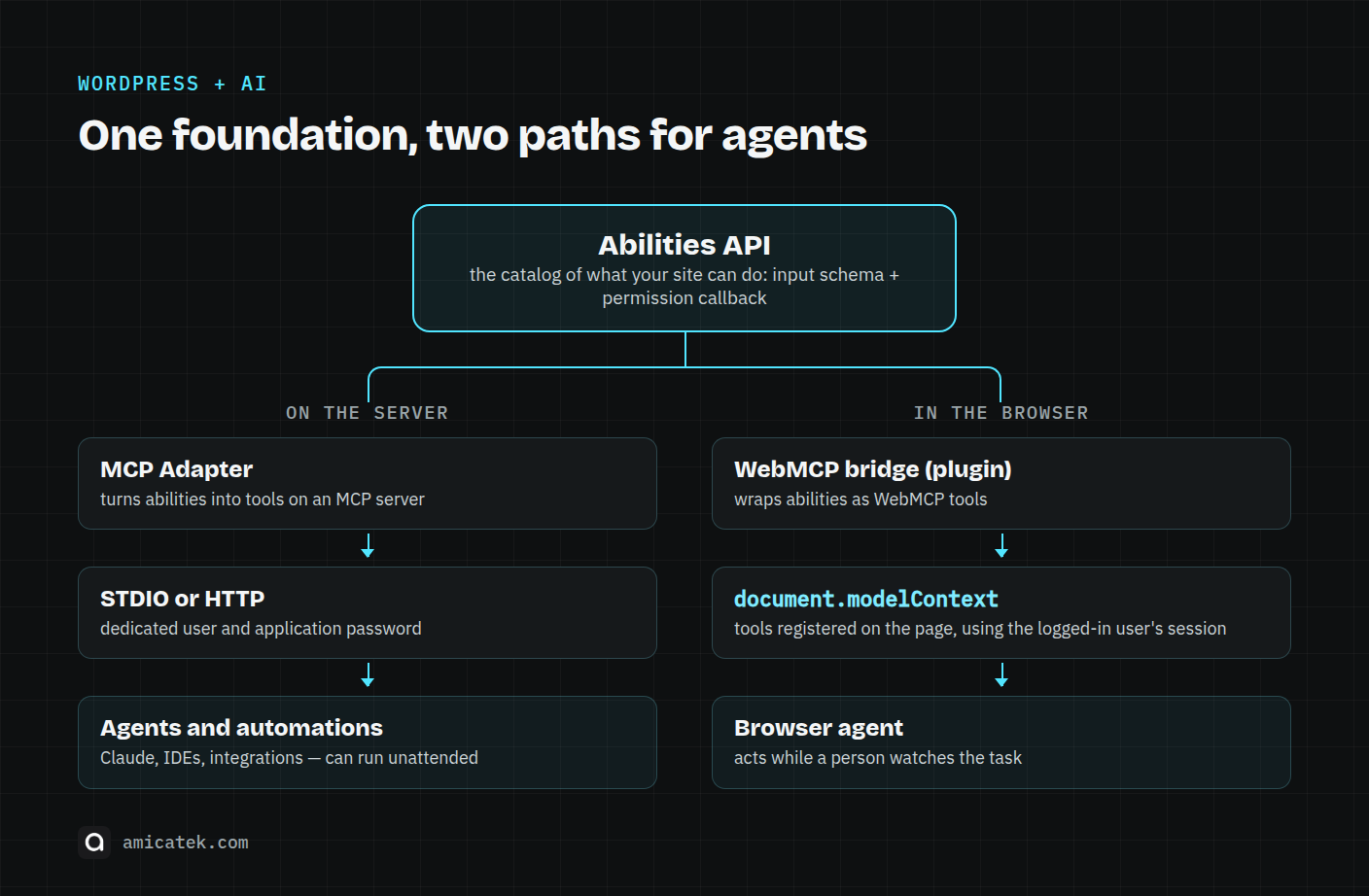
What connects them is the Abilities API, available since WordPress 6.9. It works as an inventory of what the site can do, including the input schema and the callback that checks permissions. However, as the official WordPress Developer Blog’s September roundup pointed out when announcing WebMCP support in WordPress Playground, registering an ability on its own is not enough: a plugin has to wrap it in a WebMCP tool.
What Already Exists for WordPress
The ecosystem is still experimental, but three efforts are worth following.
1. The experiment in the official AI plugin
Pull request #1081 in the WordPress/ai repository, opened on September 30, 2026 and still marked as a draft, adds a WebMCP experiment to the block editor. It registers 14 tools that operate the editor: reading the document structure, setting the title, inserting, moving, duplicating and transforming blocks, undoing, saving, and publishing.
It only loads on post editing screens and must be enabled under Settings > AI, with a default cap of 30 tools per page. So far, the pull request has not been reviewed or merged.
2. Bridges between the Abilities API and WebMCP
The WebMCP Abilities plugin by Code Atlantic converts registered abilities into WebMCP tools. Its code is public on GitHub and awaiting review in the WordPress.org plugin directory. Its stated requirements are WordPress 6.9 or later, PHP 8.0 or later, and HTTPS.
Some of its security decisions are a useful reference:
- on fresh installs, abilities are hidden by default, and the administrator chooses which ones to expose;
- the permission callback is re-evaluated at execution time, not just when the tool is discovered;
- write operations require a nonce, there are rate limits per user and per tool, and input size and schema are validated.
To expose an ability as a public tool, the plugin uses a dedicated meta field:
wp_register_ability( 'my-store/search-products', array(
    'label'               => 'Search products',
    'description'         => 'Searches the product catalog by keyword.',
    'category'            => 'my-store',
    'input_schema'        => array( /* ... */ ),
    'execute_callback'    => 'my_store_search_products',
    'permission_callback' => '__return_true', // public read-only only
    'meta'                => array( 'wmcp_visibility' => 'public' ),
) );
There are also alternatives such as WebMCP Bridge in the official plugin directory. Before putting any of these into production, check who maintains it, how often it is updated, and what it exposes by default.
3. WordPress Playground
Playground — WordPress running entirely in the browser — now supports WebMCP, forwarding the embedded site’s tools to the outer page. It is the simplest, lowest-risk way to experiment without touching a real installation.
Risks You Should Not Ignore
The specification dedicates a full section to security and privacy. The main risks are:
- Prompt injection. A tool runs with the logged-in user’s session. If the agent is manipulated by malicious content in another tab or in a comment, it can call real tools with real permissions.
- Misrepresented intent. The agent decides based on the tool’s description. A vague or misleading description can trigger inappropriate calls.
- Privacy leakage through over-parameterization. A tool that asks for more parameters than it needs can become a channel for collecting data it shouldn’t.
- Same-origin boundaries. Agents carrying context between different sites can mix data that should stay separate.
Chrome’s guidance for tool authors is direct: use consequentialHint for significant actions such as payments; set untrustedContentHint when a tool returns third-party content such as comments or reviews; restrict exposure with exposedTo; keep descriptions under 500 characters; and cap tool outputs at 1,500 characters.
Chrome also plans requestUserInteraction(), an API to ask the user for confirmation during execution. It is not available yet.
Should You Adopt WebMCP Now?
Given the technology’s current stage, here is our take:
- For most business websites, not in production yet. The specification is still a draft, support is in an origin trial, and as of July an independent survey found that the leading agents were not yet calling WebMCP tools in any broad way.
- The groundwork is worth starting now. Organizing what your site can do as clear abilities, with well-defined schemas and proper permissions, helps the MCP Adapter today and makes WebMCP adoption easier later. That effort is not wasted as the technology evolves.
- Start with read-only tools. Content search, catalog lookups, opening hours, availability. Actions that change data — orders, form submissions, editing — should come later, with human confirmation and activity logging.
- Test in isolated environments. Use Playground or a staging site, enable the Chrome flag, and use the Model Context Tool Inspector extension.
- Keep an eye on WordPress 7.2. Beta 1 is scheduled for October 20–22, and the final release for December 8–10, 2026. The AI team is evolving the Abilities API from read-only abilities toward management abilities (create, update, delete). Without proper controls, that kind of capability can become a significant risk.
Final Thoughts
WebMCP gives AI agents a more structured way to operate websites through the browser, replacing visual guesswork and blind clicking. In WordPress, pairing it with the Abilities API is a natural fit, and the experiment in the official AI plugin shows where the project is heading.
It is not yet time to roll the technology out indiscriminately in production. But it is a good moment to map what your site does, decide what can be exposed, and set the right permissions for each capability.
If you want to know how ready your WordPress site is for AI agents — abilities, MCP, permissions, and what can be exposed safely — Amicatek can help. Start with our website assessment or get in touch to talk about AI consulting for WordPress.
Sources
- WebMCP — Draft Community Group Report (W3C Web Machine Learning CG)
- WebMCP origin trial — Chrome for Developers
- WebMCP — Chrome documentation
- Secure WebMCP tools — Chrome for Developers
- Add WebMCP experiment — PR #1081, WordPress/ai
- What’s new for developers? (September 2026) — WordPress Developer Blog
- WebMCP Abilities — Code Atlantic (GitHub)
- The State of WebMCP: July 2026 — Spronta
- WordPress AI Team — make.wordpress.org/ai